Friday, December 11, 2009

Variables

In previous posts, like, Object Oriented Programming, we talked a bit about objects and variables, but in an abstract way. Now, let's get more specific.

A variable is a name for an object. For example, let's think of a person, Nicole, as an object. Now, Nicole, herself is an object, but the word "Nicole" is a name that refers to Nicole the person. Similarly, we can give names to our objects. These names are called variables. Let's see an example:

(
  var greeting; 
  greeting = "hello world";
  greeting.postln;
)

To run this code, copy it into a new window in Supercollider and then double click just inside the opening parenthesis to highlight all of it. Then, click the enter key. (Not the return key.) (see also: this video for help.) If you look in the Post window, it should say, "hello world."

What's going on there? The first word, "var," is short for variable. A variable is a storage location. It's a place to store a piece of data. The contents of data stored may vary, which is why it's called a variable. The second word "greeting" is a name. It is the name of the variables. Here we are declaring to the interpreter that we will have a variable named "greeting." The interpreter is the part of SuperCollider that reads and runs our programs. So, when the interpreter is reading our program and sees the word "greeting" it will know that greeting is a variable that we've declared. Otherwise, it wouldn't know what we were talking about.

All variable names in SuperCollider must start with a lowercase letter and cannot be a reserved word. You cannot have a variable called "var" because var already has a special meaning to the interpreter.

Next we are assigning a value to the variable. greeting gets "hello world". The variable is on the left of the equal sign. It must always be on the left. There can only ever be one thing on the left of an equals sign. That sign is saying, 'hey, take whatever is on the right of this equals sign and store it under the variable name on the left.'

In the last line, we're sending a postln message to the variable. The SuperCollider interpreter sends that message to greeting. greeting is a String. Strings print themselves with the postln message. So because greeting is a String, the contents of greeting, "hello world", print out.

On the left is the variable name, an object. Then is a period. Then is the name of the message. There are a few different coding styles allowable in SuperCollider, but we're going to focus on receiver notation because it is common across many programming languages. That is:

object.message;

Notice the semi-colons. In Supercollider, all instructions must be separated with a semi-colon. A single instruction can span many lines, so the interpretter needs the semi colon to know when one thing is done and another is starting. Later on, when you're trying to figure out why some program isn't working, you're going to discover a missing semicolon. To be on the safe side, it's good practice to put one at the end of every instruction, as in the example.

Summary

  • Variables are named bits of memory which can store objects.
  • Variables must be declared. Their names must start with lowercase letters
  • You can assign data to a variable by putting it alone on the left side of an equals sign.
  • We send messages to objects with the notation object.message
  • Lines of code must be separated with semicolons

The next chapter will make sounds.

Monday, April 07, 2008

Conductors: a fast GUI

I usually use Conductors because they're quick and dirty and can very easily be used to control a synth or a pbind. This class is from Ron Kuivila and it's included in the Wesleyan build or else available as quark. (See the Quarks helpfile for more on how to get it.)

Here's a quick example:

SynthDef("sin", {arg freq = 440;
  
  Out.ar(0, SinOsc.ar(freq))
}).store;
  
  
Conductor.make({arg this_conductor, freq;
  
  freq.spec_(\freq);
  
  this_conductor.synth_(
    ( instrument: "sin" ),
    [freq: freq]
  )
}).show
  

The constructor method for a conductor is make, which takes a function for an argument. The first argument to the function refers to the freshly-created conductor. Then, for the rest of the arguments, list things you want to control. So I put here "freq". freq is initalised as something called a CV.

CVs are very handy for scaling things. They have a low value, a high value, an initial value and can be linear or exponential. So a fader with a CV can slide back and forth and give you meaningful numbers in the range that you want. There's a bunch of pre-defined CV settings that can be useful for certain applications. Like here, the freq CV is being set to a pre-defined specification for audible frequencies.

Next, we're telling the conductor that it should be controlling a synth.

The first argument here is a list. We tell it which synth to use. We could also say which server to send it to and it's group and things like that.

The second argument is an array of name: value pairs. [name_of_synth_arg: name_of_cv, name_of_another_synth_arg: name_of_another_CV] This usage here ties the CV freq to the synth argument freq.

Finally we show the whole thing and you get a box with some buttons on it and a slider. The syntax of of the Conductor is slightly obtuse, but, as you can see from the box that popped up, you get a lot of stuff for free. If you click on the > button, it will start playing. Wiggle the fader. [] stops it.

We can modify the above example a little bit to see this maybe a bit clearer:

SynthDef("sin2", {arg freq1 = 440, freq2 = 10;
  
  Out.ar(0, SinOsc.ar(freq1, SinOsc.ar(freq2)))
}).store;
  
  
Conductor.make({arg this_conductor, freq, pm;
  
  freq.spec_(\freq);
  pm.spec_(\widefreq);
  
  this_conductor.synth_(
    ( instrument: "sin2" ),
    [freq1: freq, freq2: pm]
  )
}).show;

Ok, so the newer synth does some silly phase modulation.

The conductor now has two CVs called freq and pm. We set pm to have the pre-definied spec for frequencies that include the sub-audible range. Other such specs include: unipolar, bipolar, freq, lofreq, midfreq, widefreq, phase, rq, audiobus, controlbus, midi, midinote, midivelocity, db, amp, boostcut, pan, detune, rate, beats, delay If you want to see what those other ones are like, you can create a bunch of Conductors with them and wiggle the sliders around and see what you get for values.

And finally, if you look at the array to attach the synth, it's a bit clearer that freq1 belongs to the synth and freq comes from the conductor. freq2 belongs to the synth and pm comes from the conductor. And when you show it, you get two sliders.

Using a Conductor with a pattern is really straight forward:

Conductor.make({arg this_conductor, freq, amp;
  
  freq.spec_(\freq);
  amp.spec_(\amp);
  
  this_conductor.pattern_(Pbind(\freq, freq, \amp, amp)); }).show

When you play it, you'll have to turn up the amp. And you can put anything you want in that Pbind. It's just like any other Pbind. Anything you want on a gui, you can put in the argument for the Conductor. You can also do things like:

Conductor.make({arg this_conductor, freq, amp;
  
  freq.sp(3, 0, 5, 1, 'linear');
  amp.spec_(\amp);
  
  this_conductor.pattern_(
  Pbind(
    \amp, amp,
    \freq, Pfunc({[100, 250, 374, 580, 687, 910].at(freq.value)})
  ));
}).show

Here, the freq can be integers between 0 and 5. In the Pbind, a Pfunc uses the value of the freq slider as the index for an array. You need to do a whatver_cv.value to get the value that the slider is giving you. You can also set the value with whatever_cv.value_, which can make your sliders wiggle themselves around. If you want to wiggle them with a joystick or something, you might use whatever_cv.input_ and pass in a value between 0-1. This helps with the scaling.

So, for example, here's a change to the amp:

Conductor.make({arg this_conductor, freq, amp;
  
  freq.sp(3, 0, 5, 1, 'linear');
  amp.spec_(\amp);
  
  amp.value_(0.2);   
  this_conductor.pattern_(
    Pbind(
      \amp, amp,
      \freq, Pfunc({[100, 250, 374, 580, 687, 910].at(freq.value)})
  ));
}).show

Update

Conductors have been moved to become a Quark. This is a plugin system for SuperCollider that allows you to install extra libraries. If you are using the latest version of SuperCollider (any version of 3.7 alpha or higher or any version of 3.6 downloaded in the last several months), simply type: Quarks.gui and evaluate it to get a nice gui for all the quarks. Click the 'update quarks listing' button, then find Conductor in the list and mark it for install and click apply. Restart the interpreter (command-shift-l) before using any newly-installed Quark. If this does not work and you are on 3.6 or lower, see these instructions. For more information about Quarks in general, see the help page.

Sunday, April 09, 2006

Fast Pbind-based Introduction for Experienced Programmers

You may wish to quickly scan the first post to find a bit of background

Online resources

The program

starting SuperCollider
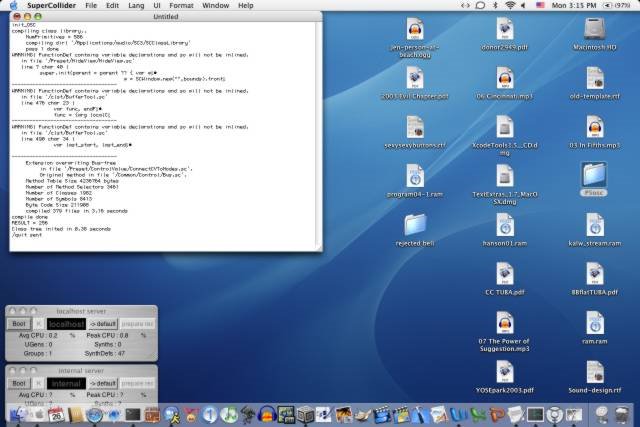
  • Once the program is downloaded and running, it should look like the image at left.
  • Boot a server by clicking on the boot button of the localhost server or the internal server
  • Put your code in a new window
  • run code by selecting it and hitting enter (not return)
  • stop code by hitting command-.
  • get help by selecting the name of a class (or help topic) and typing command-?
  • if you enclose code in parenthesis, you can click on the parenthesis to select a block
  • SuperCollider is a dialect of SmallTalk
  • the server is a different process than the language. they communicate via a protocol called OSC

Code examples

First Program

 Pbind.new.play
  • Pbind is a class. All class names start with capital letters and nothing else can.
  • new is a message, which, by convention, causes a new instance of the class (an object) to be returned.
  • play is a message passed to the new object.
  • object.message
    is the most common syntax in supercollider and is called receiver notation. Other notations are allowed, including normal small talk notation and something called functional notation, which we'll talk about later
  • everything in Supercollider is an object
  • Pbind is part of a set of related classes called patterns

Symbols and Patterns

 Pbind(\dur, 0.5, \freq, 660).play
  • If you don't specify a message to a class, but pass it arguments, it's assumed you're calling new (this is confusing, but you'll see it all the time in help files)
  • Pbinds work by creating a type of object called an event. Events are kind of like the makenote in MAX. It has a bunch of possible parameters and handles a bunch of stuff for you, like computing midinote number based on a supplied frequency or vice versa. It also handles timings by keeping track of server latency (the delay between asking for something to happen and it happening) and sending OSC messages ahead of time
  • Pbinds take as arguments a comma separated list of symbols (which correspond to parameter names) and Patterns (or constant values)

Pfunc

   
 (
  Pbind(
   \dur, 0.4,
   \note, Pfunc({
   
      12.rand
     })
  ).play
 )
  • Pfunc starts with a capital letter, therefore, it must name a class
  • Pfunc is a class, since it's got an argument, there's a constructor being called
  • it takes a function as an argument. functions are declared by code surrounded by curly braces
  • the last line in a function is the value it returns
  • Pfunc is a subclass of Pattern
  • Pbind calls the Pfunc for every event and uses the return value to specify what value goes with \note
  • rand is a message sent to 12, which is an object and an instance of Integer, which is a subclass of SimpleNumber. objects understand all the messages that their class and superclasses understand. When an instance of SimpleNumber (or one of it's subclasses) receives a message of rand, it returns a number between 0 and the object

Declaring Variables and if

 (
  Pbind(
   \dur, 0.4,
   \note, Pfunc({
      var rand_num;
      
      rand_num = 13.rand;
      (rand_num >= 12). if ({
       rand_num = \rest;
      });
      
      rand_num;
     })
  ).play
 )
  • variables are named bits of memory which can store objects. they must be declared. their name must start with a lowercase letter. They only exist within their code block. rand_num only exists in it's Pfunc
  • SuperCollider gives you 26 variables wich it keeps track of all the time. They are named a - z. s holds a pointer to the server
  • = is an assignment so that rand_num holds the result of 13.rand
  • statements have to be separated by semicolons
  • (rand_num >= 12) is an expression which is either true of false. Therefore, it is a type of object called a Boolean. Booleans can take a message of if. If the boolean is true, it will evaluate the function passed as the first argument to if. If it's false, it will evaluate the second function, which is optional. If you don't tell it about second function, it does nothing.
  • \rest tells the Pbind to rest
  • the function returns rand_num, which has in it either an integer or \rest
  • you sometimes also see if with functional notation, which is message(object, arguments) so that would look like
    if((rand_num >= 12), { rand_num = \rest });
    This is not for any particular reason except that visually, it looks more like C or C++

Prout

  
 ( 
  Pbind(
   \dur,  0.4,
   \note,  Prout({
      var bangs, note;
      
      bangs = (4 * 3 * 7 * 2) -1;
      // do full loop twice
     
      bangs.do({ arg index;
    
       note = 10;  
      
       (index % 4 == 0).if ({
        note = note + 5;
       });
       (index % 3 == 0).if ({
        note = note - 3;
       });
       (index % 7 == 0).if ({
        note = note + 6;
       });
      
       note.yield;
      });
    })
  ).play;

  // code stolen from http://www.perl.com/lpt/a/2004/08/31/livecode.html
 )
  • Prouts are like Pfuncs, except they treat their function as a Routine. A Routine is a kind of function which can pause and restart.
  • math operations go form left to right, like a cheap calculator. + and - have the same precedence as * and /, so use parenthesis to specify order of operations
  • // indicates a comment as does /* comment is in between these */
  • giving the message do to an object which is an instance of SimpleNumber causes the function it gets as an argument to be evaluated object+1 times. When it evaluates the function, it gives it an argument the number of iteration it's on, from 0 - object
  • % is modulus, which is the remainder when doing division: 13 % 5 = 3 because 13 = (5 * 2) + 3
  • == tests for equivalency
  • yield is a message which you can pass to any object within a Routine. That object is then returned from the routine, so in this case, Pbind can use it for a note number. When the routine is restarted, it picks up from where it left off.
  • When the Prout eventually runs out, after going through the loop bangs times, it will return nil, which will cause the Pbind to stop playing

Ptpar

 (
 
  Ptpar([0, 
   Pbind(\dur, 0.8,
    \octave, 4,
    \degree, [1, 3, 5],
    \amp, 0.2),
   0, Pbind(\dur, 0.4,
    \octave, 5,
    \degree, Pseq([1, 4, 5, 7, 8, \rest, 5, 7, 5, 5, 6], inf),
    \amp, 0.3)
   ]).play
 )
  • Ptpar takes an array as an argument to it's constructor. Arrays can be declared by putting a list inside square brackets, so [1, 3, 5] is an array. Ptpar's array is made up of pairs of times and patterns. This synchronizes multiple patterns
  • \octave and \degree are just other ways of naming notes
  • if you list an array as one of the value pairs in a pattern, it will create multiple events, one for each item in the array, so the top Pbind sends three sets of OSC messages to the server every time it makes a note
  • Pseq steps through an array, returning each item in turn. It takes two arguments, the first is the array and the second is the number of times to step through it
  • inf is a reserved word which means infinite, so the Pseq never stops stepping through the array. If we gave a 2, instead, it would step through the array twice and then return nil, which will stop the Pbind it is inside, but not the other Pbind, which will keep running forever

Tying things together

 
   (
    Pbind(
     [\freq, \dur], Pfunc({
     
       var pitch, dur;
       
       pitch = (10.rand * 44) + 440;
       if ((pitch < 660), {
        dur = 0.45;
       } , {
        dur = 0.25;
       });
       
       [pitch, dur]
      })
     ).play
   )
  • You can put symbols in arrays and then give them an array of values. The symbol at index n is tied to the value at index n.
  • This lets you tie related parameters together
  • Make sure your Pfunc or Prout or other Pattern returns an array when an array is expected

Accessing Events

  
   (
    Pbind(
    
     \freq, Pwhite(440, 880),
     \dur, Pfunc({arg evt;
          
        (evt.at(\freq) < 660).if ({
         0.45;
        } , {
         0.25;
        });
     })
  ).play
 )
  • Pwhite is a Pattern which returns a value between it's first argument and it's second argument
  • Pfuncs and Prouts can have an argument to their function which is the event as it's been constructed so far. This gives you access to all the parameters which have already been set
  • ifs return the result of the function which they evaluated
  • You can find more Pthings in the help file for Patterns

Array.do and while

   (
    Pbind(
     \dur,  0.25,
     [\freq, \amp], Prout({
     
        var arr, amps;
        
        arr = [];
        amps = [0.2, 0.3, 0.4];
        
        {arr.size < 10}. while({
        
         arr = arr.add((10.rand * 44) + 440);
           arr.do({ arg item, index;
        
          [item, amps.wrapAt(index)].yield;
         })
         
        })
       })
    ).play
   )
  • functions understand the message while. the function is evaluated, if it returns true, the function passed as an argument to the while loop runs once. Then the receiver is evaluated again. This repeats until the receiver evaluates to false.
  • Array.size returns the size of the receiver
  • Array.do is a way to step through an array. The function takes as an argument the array item and the index of the item
  • Array.add is a message which adds an item to an array. Arrays cannot grow in size beyond what they were originally allocated. Therefore, the receiver may be unchanged, although the action returns a new array with the added item. Therefore, if you want to add an item to an array, assign the result to a variable
  • wrapAt is a way to access the contents of the array such, that indexes "wrap around"
    amps.wrapAt(index)
    is equivalent to
    amps.at(index % amps.size)
  • Arrays can be accessed by index

Arrays

Arrays can take other messages, like scramble, which returns a reordered array but does not change the receiver of the message. Choose returns a single randomly chosen item from an array. Many other messages can be found in the helpfiles for Array and it's super classes.

A quick GUI Example

   
   (
   c = Conductor.make({arg thisConductor, arrSize, vol, freq, dur;
    
    vol .spec_(\db);
    freq.spec_(\freq);
   arrSize.sp(10, 1, 50, 1); // sp( val, min, max, step, warp)
    dur.sp(0.45, 0.1, 1, 0);
     
    thisConductor.pattern_(Pbind (
     \db,  vol, 
     \dur, dur,
     \freq, Prout ({
     
         var arr, diff;
        
       arr = [];
       
        
       {arr.size < arrSize.value}. while({
        
        arr = arr.add(freq.value);
          arr.do({ arg item, index;
        
         item.yield;
      });
     });
    })
   ));
  });
  
  c.show;
  )
  • Conductor is a graphical class which gives you some gui widgets. It is included in the Wesleyan build.
  • the first argument is the conductor itself. we can't call it "this" because that's a reserved word
  • the additional arguments are control values, instances of CV. they get GUIS assigned to them usually
  • CV.spec_(\symbol) gives you a predefined ControlSpec which is is designed for a particular type of CV
  • Otherwise, you can define your own. step refers to how big the steps are between values
  • You can give the Conductor a pattern (such as a Pbind) and use the CVs as Patterns
  • If you have to refer to CV in a function or a routine and you want the value that the slider is currently at, use CV.value

Wednesday, February 16, 2005

Server

In the introduction, we executed some code:

 Sever.local.boot

Server is a class. We can tell it is a class because in SuperCollider, all class names start with capital letters. Nothing else may start with a capital letter.

local is a message. Supercollider uses a syntax called receiver notation, which looks like:

 object.message(argument1, argument2, . . . argumentN)

Or

 Class.message(argument1, argument2, . . . argumentN)

The arguments are optional. So “Server.local” takes the class “Server” and passes the message “local” to it.

When we send a message to an object or a class, we get a return value. The object or class gives us something back. Often, but not always, what we get back is the object or class that we just sent the message to. Sometimes, however, we get back something else. Server.local returns an object that refers to the localhost server.

Server.local is a getter message. The Server class contains some data that belongs to the class rather than to any particular instance of the class. We can get at that data by using a getter message. Getter messages return data stored within an object or a class. Setter messages have a similar concept. They set a piece of data within an object or a class. We’ll talk about them more later.

We then take the result of Server.local (which is an object that refers to the localhost server) and send that object the message “boot.” Expressions are evaluated left to right, so Server.local.boot is equivalent to (Server.local).boot. An expression is a bit of code that returns a value. Server.local is an expression because it returns something. Server.local.boot is also an expression because it also returns something.

Server.local is not, itself, the localhost server, as that is a separate process. However, Server.local contains information about the localhost server. The object knows how to communicate with the Server via OSC. So when we tell it “boot”, it translates that for us into an OSC message and sends that message to the separate Server process.

  • Class names must start with capital letters and are the only things that start with capital letters.
  • We pass messages in receiver notation as object.message(argument) or Class.message(argument)
  • Classes and objects return something when you send them messages.
  • Getter messages return data stored within an object or a class.
  • Expressions are bits of code that return something. They are evaluated from left to right.
  • Server.local is an object which can do OSC communication for us.

Object Oriented Programming

Programs and Algorithms

An algorithm is a step-by-step way to solve a problem or complete a task. You can think of it like a musical score. You play a score in order from left to right, playing each note or rest one after each other, jumping backwards in case of repeats and forwards in cases of things like second endings or codas. In the same way, you can tell your computer to play a B for two seconds and then an A and tell it to repeat back and so on. You're able to tell your computer to do more complicated things, like play a C if you move your mouse to the upper right hand corner and a D in the left hand corner.

For example, imagine making a toasted bagel with cream cheese. Your algorithm might go like this:

  1. Get a bagel
  2. Cut bagel in half
  3. Toast the bagel
  4. Spread cream cheese on each half, on the side that was cut.

Programs are coded according to algorithms. A program is a series of instructions that a computer follows to complete a task. In order to communicate instructions to your computer, you need to be able to speak a language in common with it. The native language of computers is called machine code and is made up of nothing but ones and zeros. Every kind of computer speaks a different dialect of machine code. Fortunately, there exist programming languages that are easier for humans to learn. You write your instructions (or code) in the SuperCollider language and when you evaluate them (by highlighting them and pressing enter), the interpreter translates them to machine code. Your program is made up of the lines of code that you write.

  • You start by thinking of your algorithm and then create a program to implement it.

Objects and Classes: a theoretical example

Let’s use our bagel algorithm to create pseudo-code that looks like object-oriented code. Pseudo-code is a mockup of a program. It will look like a SuperCollider program would look if it dealt with food instead of sounds.

Our algorithm starts with:

  1. Get a bagel

In real life, we would get a bagel from a bag of bagels. In an object-oriented language, we would think of the bagel as an object that we could manipulate. An object is an entity containing data and methods for accessing that data. The definition of a type object is called a class.

A bagel object would probably contain information about whether it was cut or toasted and what toppings it would have. Classes define objects and are a blueprint for object creation. They also can create objects. Classes contain methods called constructors that create new instances of the class and initialize them. We would send a message to the Bagel class asking it to make us a bagel object.

 Bagel.new;

Bagel is the class. new is the message. Once we have the new object, we need to remember it, so let’s change that to give it a name:

 my_bagel = Bagel.new;

my_bagel is the name of the newly created bagel. The equals sign is an assignment statement. my_bagel gets the new bagel. We’ll come back to this later.

  1. Cut bagel in half

In real life, we would do this with a knife. In object oriented programming, objects provide their own methods for changing their state. We send a message to the bagel saying we want it cut.

 my_bagel.cut;

my_bagel is the object. cut is the message.

  1. Toast the bagel

Again, in real life, we would put the bagel in a toaster. But, since this is an object, we send a message telling it we want it toasted.

 my_bagel.toast;
  1. Spread cream cheese on each half, on the side that was cut.

The bagel will know what to do. The author of the class has already written a method that applies a topping to each half. We just have to specify which topping we want, by using an argument. Arguments are additional data we pass along while sending a message to an object.

 my_bagel.spread(cream_cheese);

So, adding in the cream_cheese creation, our pseudo-code bagel program would look like:

 (

  var my_bagel, cream_cheese;
 
  my_bagel = Bagel.new;
  cream_cheese = Cheese.new(\cream);
 
  my_bagel.cut;
  my_bagel.toast;
  my_bagel.spread(cream_cheese);
 
 )
  • Objects are instances of the Classes that define them.
  • Objects contain data and methods to access them.
  • Classes are factories for creating new instances of objects.
  • We communicate with objects and classes by sending them messages.
  • We can specify additional information by providing arguments with our messages.

Additional reading on programs, algorithms and pseudo-code

Sunday, February 06, 2005

Introduction

What is SuperCollider?

According to http://supercollider.sf.net/:

SuperCollider is a state of the art, realtime sound synthesis server as well as an interpreted Object Oriented language which is based on Smalltalk but with C language family syntax. The language functions as a network client to the sound synthesis server.

SC was written by James McCartney over a period of many years. It is now an open source GPL'd project maintained and developed by James and a few others.

Which is to say that SuperCollider is a tool to help you use your computer to make sounds. It’s free and open source. That means that you can look at how SuperCollider was written and modify it, share it with other people and use it any way you want.

SuperCollider has a steeper learning curve than some other music programs like MAX, but it is more flexible and more powerful. This book is written for people who have not programmed before. If you can use your computer to do things like edit a document and surf the web, you can learn to program.

What Can You Do With It?

  1. Digital synthesis
    Supercollider can make any sound that can be created by DSP.
  2. FX processing
    SC can do delays, filters, etc and can tweak a line-in or a pre-existing sound file in any way that you can think to program
  3. Algorithmic composition
    Supercollider can generate sounds and play them, and it can also generate MIDI files that can be opened by Finale, Sibelius or other notation software and arranged for real instruments

Two Applications for the Price of One

SuperCollider is actually two applications. One application is an interpreter: an application designed to execute your Object Oriented programs written in the SuperCollider language.

The other program is an extremely fast and efficient sound synthesizer, which makes all the sound. This program is called a server. It can run from within the interpreter or as a separate process. An internal server (one run within SuperCollider) has a small speed advantage over a separate process. Also, there are some things that can only be run from an internal server, such as an oscilloscope plug in which lets you view the waveforms produced by the server. However, if you crash the server, the interpreter will also crash and vice versa.

A server run as a separate process is called the localhost server. Because the process is separate, there is a stability advantage because a server crash does not also crash your interpreter or vice versa. You can run a server on a separate computer, if you’d like and even communicate with it via Rendezvous. The interpreter client and audio server communicate via a network protocol called OSC. The interpreter sends OSC messages to the server based on your programs and the server sends messages back, based on what it’s doing.

About this book

Explanatory text looks like all the text we have seen so far.

Code examples look like this.

Vocabulary words are in bold and are usually followed by a definition. They can also be found in the glossary.

Key points are summarized at the end of every section in a bulleted list.

The first part of this book is about the interpreter and the programming language it uses. The second part of this book is about the server and sound design.

Getting Started

First, you need a copy of SuperCollider 3, otherwise known as SC3. You can download it from http://sf.net/project/showfiles.php?group_id=54622. SC3 exists for Mac OSX, Windows and Linux. The Mac version is the most developed and the most stable and the version referred to by this book. However, aside from the appearance and the key-shortcuts, the Windows and Linux versions should be virtually the same.

There are some websites designed to help SuperCollider users, including the SC home page at http://www.audiosynth.com/, the SWIKI at http://swiki.hfbk-hamburg.de:8888/MusicTechnology/6, and the Electronic Life SC Forum at http://electroniclife.co.uk/scforum/index.php

Using SuperCollider

Once you have downloaded SuperCollider and installed it, double click on the icon. Three windows should open on your screen. A big text window called "Untitled" should print out some information and there should be two smaller windows below it called "localhost server" and "internal server." If there is an error in the Untitled window, the two server windows will not open. Try downloading a different build of SuperCollider or running it on a different machine.

The Untitled window is where text output goes. The other two windows control two different versions of the audio Server. The examples in this document use the localhost server. If you want to hear audio, you must boot the audio server, which you can do by pressing the "Boot" button. When you press the “Boot” button on the audio server, the interpreter starts up the server application. When the server is finished booting, it sends an OSC message to the interpreter saying that it booted. Then the interpreter changes the color of the word “localhost” to red and the “Boot” button changes to say “Quit.” You can also boot a server from within a program, as we will see shortly.

To run code, you highlight it with the mouse and then press the Enter key, NOT the return key. (The enter key may be located next to your arrows or in your number pad.) To stop code that is running, hit apple-period.

To get help, hit apple-shift-?. To get help on a specific topic, for instance on Synth, highlight the word Synth and hit apple-shift-?.

Your First Program

Open a new window, which you can do under the File menu or by typing apple-n.

Boot the localhost server. You can do this from within the interpreter. To do this, type in the new window:

 Sever.local.boot

Highlight the code you just typed with the mouse and then press the enter key. Then, after the server finishes booting, type:

 Event.default.play

Highlight the code you just typed with the mouse and then press the enter key. You should hear a single short A. If you do not hear a sound, make sure that you can hear other sounds from computer and the volume is turned up. Make sure the localhost server is booted (and not the internal server). If you are still having trouble, try downloading a different build of SuperCollider or asking somebody knowledgeable for help.

Chapter Summary

  • SuperCollider is a free tool for making music that can do DSP and algorithmic composition.
  • SuperCollider is a synthesis server and an interpreter than can run together or separately.
  • You must run a server (either internal, localhost or on another computer) to hear sound.
  • Highlight code and press enter to execute it.
  • Press apple-period to stop execution
  • Press apple-question to get help